What a Small Business Needs to Be Ready When Its Website Fails
How to prepare your small business website for outages, attacks or human error: tested backups, monitoring, an incident plan and a clear recovery process.
Your website can work perfectly today and stop working tomorrow. It might be an update that breaks something, a plugin with a vulnerability, a hosting failure, a leaked password or plain human error, which is more common than most people think.
The useful question isn't whether something will fail one day. It's how long it will take you to recover when it does, and how much information you'll lose along the way.
In this article we walk through what a small business actually needs to be prepared, without overselling and without building bank-grade infrastructure for a website that doesn't need it.
Security doesn't mean "nothing will ever happen"
No technology is free of vulnerabilities. Not WordPress, not a custom React or Next.js site, not a SaaS platform, not the most expensive hosting on the market. Each one carries different risks: with WordPress they usually come from outdated plugins and themes; with custom development, from dependencies and configuration; with SaaS, from depending entirely on a third party.
That's why security isn't only about preventing attacks. It's about four things at once:
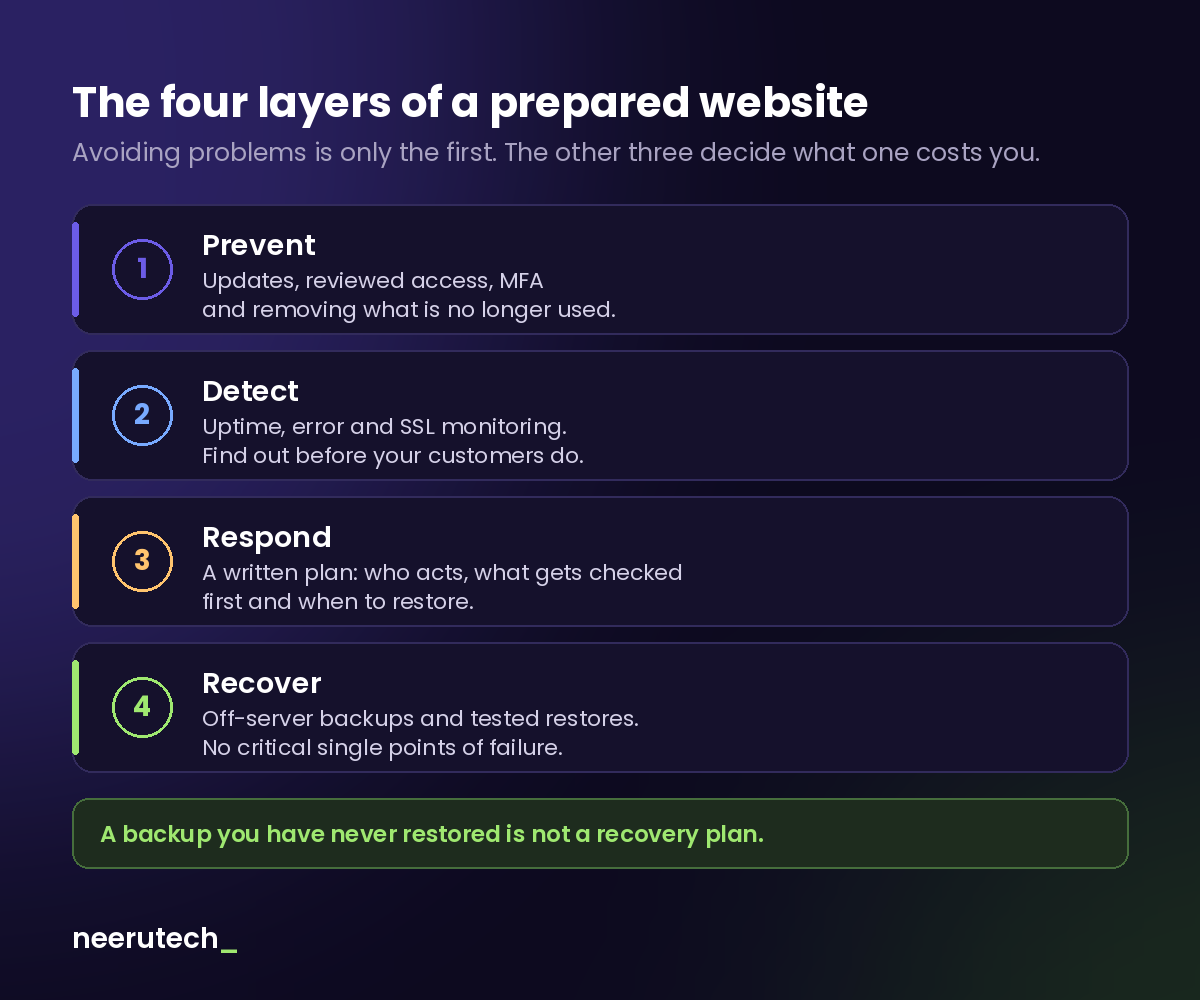
Most small business websites we see have some of the first layer (updates, more or less current) and almost nothing of the other three. And it's precisely those other three that decide whether an incident stays a scare or costs you a week of sales.
1. Keep systems and access under control
This is the best-known layer, but it's often only half done. The basics:
- Updates to the CMS, plugins, themes or dependencies, applied with judgement. Updating blindly in production is a risk too.
- Remove old users. That former employee, the previous agency or the freelancer from two years ago shouldn't still have admin access.
- Least privilege. Someone who only uploads products doesn't need to be an administrator.
- Unique passwords and two-factor authentication (MFA) on the website admin, hosting, domain registrar and email.
- Remove what you no longer use: deactivated plugins, forgotten test installs, old subdomains. Anything that exists can be attacked, even if nobody uses it.
2. Having backups isn't enough
Almost everyone thinks they have backups. Fewer people know where they are, how often they run, and whether they actually work.
A backup you've never tried to restore isn't a recovery plan. It's a hope.
What to check:
- Frequency. A site that rarely changes may be fine with daily backups. A store taking orders all day needs more frequent database backups.
- Location. If the backup lives on the same server as the website and that server goes down or is compromised, you lose both. At least one copy must be stored elsewhere.
- Retention. If a problem takes two weeks to detect (some infections do), yesterday's backup won't help: it's already contaminated. Keep several versions going back in time.
- Tested restores. Every so often, restore a backup to a test environment and check that the site comes up complete, with its database and files.
3. Know what to do when an incident happens
When the site goes down, the worst moment to decide what to do is that very moment. An incident plan doesn't need to be a 40-page document. It's enough to have clear answers to these questions:
- Who responds? A name, not "the IT person".
- What gets checked first? Hosting, domain and DNS, SSL certificate, the most recent changes.
- How do you put the site in safe mode? A maintenance page while you investigate is better than a broken site or, worse, a site still serving something compromised.
- When do you restore, and from which backup? Restoring without knowing what happened can put you right back into the same problem.
- Who needs to be told? Your internal team, and if customer data is involved, data protection obligations come into play.
4. Monitoring: find out before your customers do
If the first person to tell you your website is down is a customer, you're already late.
Basic monitoring keeps an eye on:
- Availability (uptime): whether the site responds, checked every few minutes.
- Server errors: partial outages, pages returning errors.
- SSL certificate: so it doesn't expire without anyone noticing.
- Disk space and resources: a full disk takes a site down just as effectively as an attack.
- Critical services: forms, payment gateway, email delivery. A site can be "up" and still not be selling.
You don't need anything sophisticated to start. What matters is that alerts reach someone who will act on them.
5. Reduce single points of failure
This is where redundancy comes in, and it's worth being honest: not every small business needs duplicated infrastructure. Paying for mirrored servers for a five-page company website makes no sense.
What is worth reviewing is where everything depends on a single thing:
- Domain and DNS: whose name is the domain registered under? Who has access to the registrar? Losing control of your domain is one of the hardest problems to fix.
- Hosting: if your provider goes down, could you bring the site up elsewhere using your backups?
- Database and files: are there copies outside your main provider?
- Critical providers: payment gateway, email service, CRM. What happens if one of them fails?
Redundancy should be proportional to the impact of an outage. Which brings us to the most important question in this article.
How long can your website afford to be down?
There are two questions worth answering before something happens, not during:
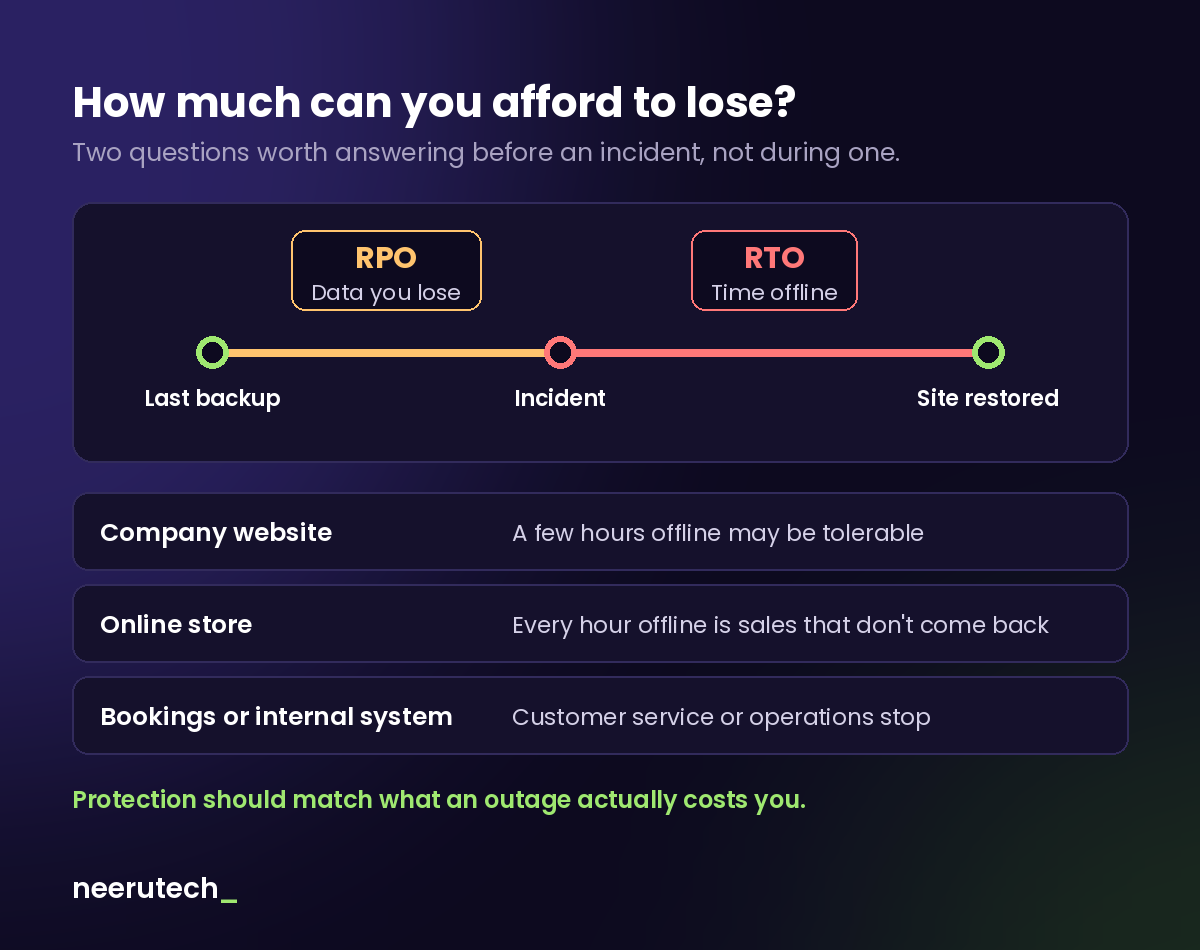
- How much data can you afford to lose? If your last backup was last night and the site goes down at 6 pm, everything that happened during the day (orders, form submissions, bookings) may be lost. Technically, this is called RPO.
- How long can you be without your website? From the moment of the incident until the site works again. This is called RTO.
There's no universal answer; it depends on the business:
| Type of website | What an outage means | Reasonable level of preparation |
|---|---|---|
| Company website | A few hours may be tolerable | Daily off-site backups, basic monitoring, a simple plan |
| Online store | Every hour is sales that don't come back | Frequent database backups, immediate alerts, rehearsed restores |
| Bookings or internal system | Customer service or operations stop | All of the above, plus reviewing critical dependencies and fallbacks |
Answering these two questions tells you how much it makes sense to invest in protection. No more, no less.
A basic checklist for small businesses
If you only keep one part of this article, make it this one:
- ✅ Automatic backups, with at least one copy off the server
- ✅ A restore tested in the last few months
- ✅ CMS, plugins and dependencies updated with judgement
- ✅ Two-factor authentication on website, hosting, domain and email
- ✅ Access reviewed: no old users or excess permissions
- ✅ Uptime and SSL monitoring with alerts someone actually handles
- ✅ A named person responsible for incidents
- ✅ A recovery plan, even if it's one page long
- ✅ Domain and hosting controlled by the company, not a third party
- ✅ Minimal documentation: where everything is and how to access it
Conclusion
Security isn't about guaranteeing there will never be a problem. It's about reducing the chance that one happens and being ready to respond when it does.
A website isn't a project you deliver and forget. For many small businesses it's a sales channel, a working tool and the first point of contact with customers. Treating it that way is what makes the difference between a scare and a serious problem.
If you want to go further, you might be interested in what good website maintenance includes or our comparison of WordPress vs custom development, where we look at the risks of each option.
Frequently asked questions
Is WordPress less secure than a custom website? Not necessarily. WordPress is attacked more because it's the most widely used CMS, and many problems come from outdated plugins. A custom site has other risks: unreviewed dependencies or poor configuration. What determines security is how the site is maintained, not the technology.
My hosting provider already makes backups. Isn't that enough? Maybe not. Check where they're stored (if they're with the same provider and the provider fails, you lose them), how many days they're kept, and whether you've ever tried restoring one.
How often should I test restoring a backup? There's no fixed rule, but doing it at least a couple of times a year, and always after major changes to the site, already puts you ahead of most businesses.
Do I need a redundant server? Only if an outage costs you enough to justify it. For most small businesses, good off-site backups, monitoring and a rehearsed restore are a better investment.
Do you know how long it would take to get your website back if it stopped working tomorrow?
At Neerutech we can review your backups, access, updates, monitoring and critical points with you, so you know what risks you have today and what's worth improving. See how we work.
Has your website ever gone down, only for you to find out the backup didn't work?
Related articles
 Destacado
When to Leave Excel Behind: Signs Your Business Needs Something Else
The signs your business has outgrown the spreadsheet, the three steps before commissioning custom software, and how to switch without breaking anything.
 Destacado
How Much a Website Costs for a Small Business in Spain
Orientative price ranges for a small business website in Spain, what drives the budget, what's usually included and what it costs to maintain each month.
 Destacado
WordPress or Custom Development: Which One Fits Your Business
An honest comparison of WordPress and custom development: self-editing, portability, total cost and when each option fits a small business.