WordPress on AWS: What It Really Costs and Why We Moved to Managed Hosting
Real case: we moved four WordPress sites from AWS to managed hosting. What the server bill hides, how much the client saved and how we did the migration.
This week we finished migrating a client's websites from AWS to our servers. They had four WordPress sites, each on its own instance, and a question we hear often: "If AWS is Amazon and it's so powerful, why move away from it?"
The short answer: AWS is excellent infrastructure, but for a small business with nobody managing the server, the instance price isn't what it really costs to keep the website there.
Here's the case, what changed on the bill, and how we handle this kind of migration.
AWS isn't expensive. Everything it doesn't include is
Many WordPress sites on AWS run on Lightsail, Amazon's simple virtual server service. You can spin up an instance with WordPress pre-installed in minutes, and the monthly price looks very reasonable.
The problem is what that bill doesn't show:
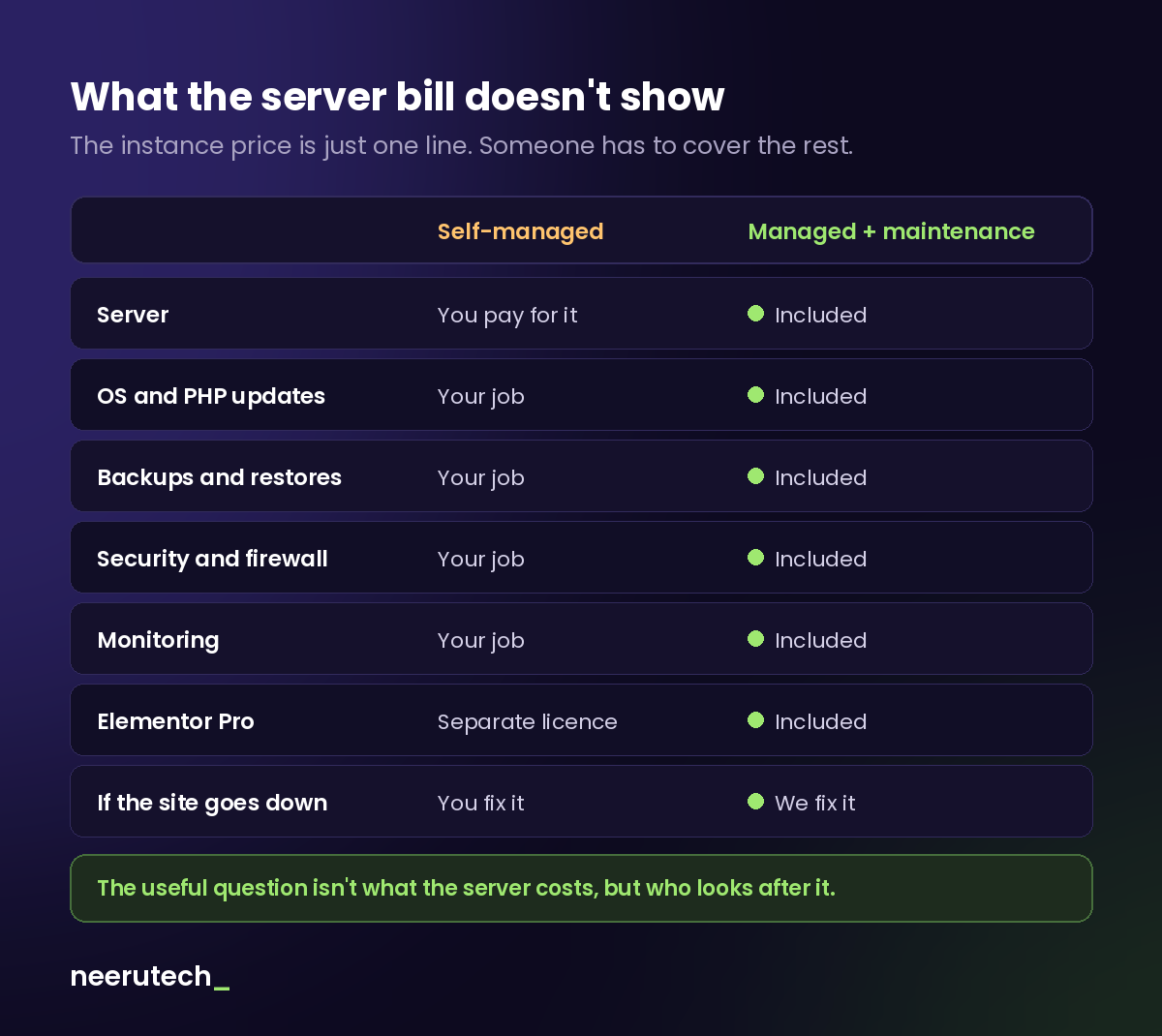
With a self-managed server, someone has to:
- Keep the operating system, PHP and database up to date, not just WordPress.
- Set up and check backups, and make sure they can actually be restored.
- Handle security: firewall, access, certificates.
- Monitor that the site is up and find out when it goes down.
- Pay for licences for premium plugins, such as a page builder.
- Fix things when something breaks on a Saturday night.
If someone technical in your company does all of that, AWS can be a great option. If not, or if you do it yourself when you find the time, the real cost lies in time, risk, or both.
The case: four sites, four instances and a hard-to-maintain builder
Our client had:
- Four AWS instances, one per website, each with its own server to maintain.
- A little-used page builder, with a small community and few professionals who know it well. Every design change cost more than it should have, and the new ideas they had for their pages were hard to deliver with that tool.
So rather than a migration, it was a rebuild: we recreated the pages in Elementor, the most widely used WordPress page builder, and hosted them on our infrastructure.
What changed on the bill
We won't share exact figures, but we can share proportions:
- Hosting costs dropped by roughly half compared with what they paid AWS for the four instances.
- The total bill went down slightly, and now includes things they didn't have before: an Elementor Pro licence, backups, monitoring, updates and a single point of contact if anything fails.
In other words, for the same or less than they were paying for the servers alone, they now get hosting, maintenance and Elementor Pro.
Why it works out cheaper with us
We use an agency hosting plan: managed infrastructure where we host several client websites. Sharing resources across projects brings the cost per site down significantly compared with running a separate server for each one, and the provider handles the server layer (hardware, network, baseline security).
Many managed WordPress hosting providers work this way, such as SiteGround, Hostinger or Raiola Networks. The difference between signing up yourself and working with us is that, on top of hosting, someone looks after the website: updates, backups, security, monitoring and day-to-day changes.
How we migrate a website, whatever its state
We've migrated all kinds of websites: outdated, poorly maintained, running licences of dubious origin and even hacked and infected. The process is always the same:
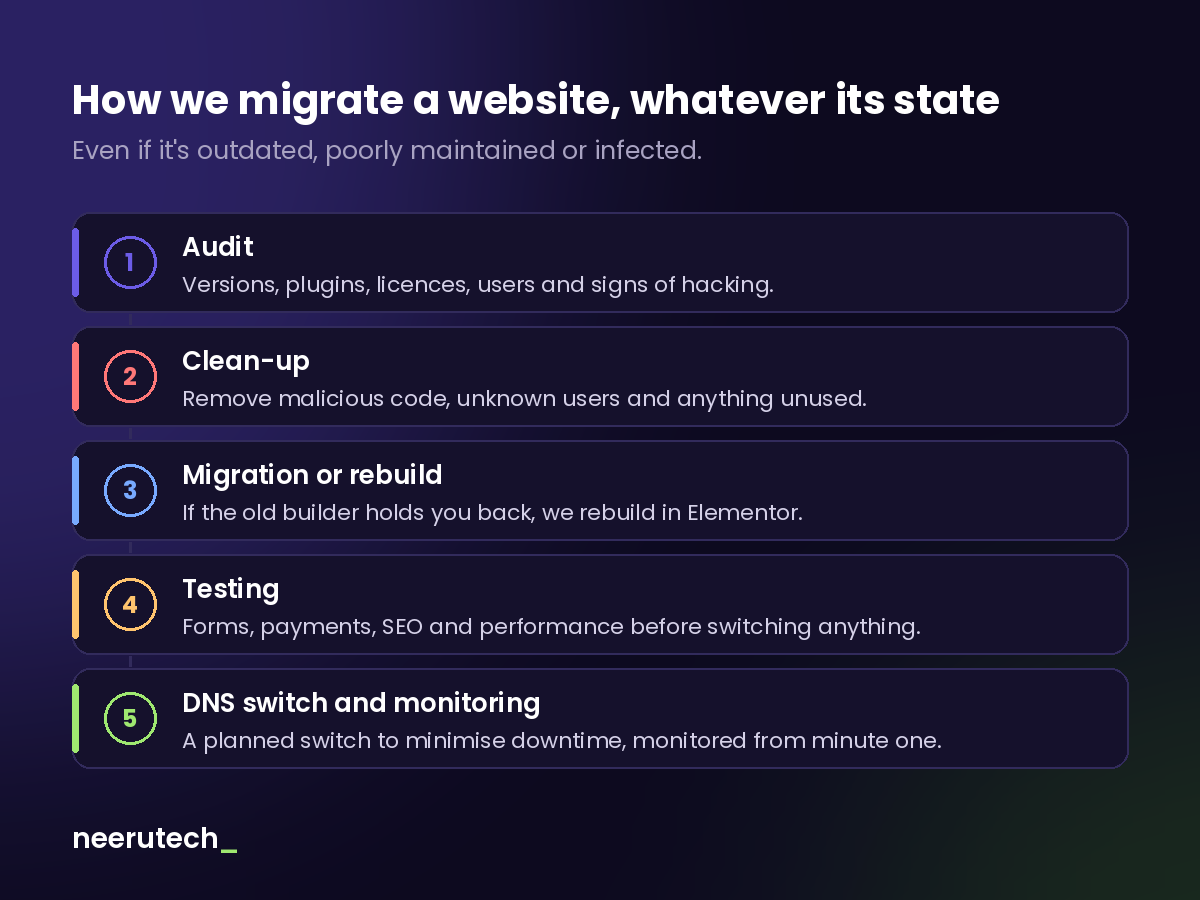
1. Audit. Before moving anything, we review WordPress and PHP versions, plugins, licences, users and any signs of hacking. This decides whether the site can be migrated as is, or needs cleaning or rebuilding.
2. Clean-up. If we find malicious code, users nobody recognises or abandoned plugins, they're removed before migrating. Copying an infected site to a new server just moves the problem.
3. Migration or rebuild. If the site is healthy, it's migrated. If the builder or theme is holding it back, as in this case, it's rebuilt in Elementor so it's easy to maintain.
4. Testing. Forms, payments, redirects, SEO and performance are checked on the new server before anything changes on the domain.
5. DNS switch and monitoring. The switch is planned to minimise downtime, and monitoring is active from the very first moment.
When does staying on AWS make sense?
Not everyone should leave AWS. Staying makes sense if:
- You have a technical team that manages servers, and does it well.
- The website is part of a larger AWS infrastructure (applications, databases, other services).
- You need very specific configurations that managed hosting doesn't allow.
For a company website, a small online store or a set of small business websites, managed hosting with maintenance is usually cheaper, more secure and far less stressful.
Conclusion
The useful question isn't what the server costs, but who looks after it. A cheap instance that nobody maintains ends up being expensive: in hours, in scares, or in a hacked website.
If you want to know what a good service should include, our article on what good website maintenance includes may help. And if you're worried about the security of your current site, here's what a small business needs to be ready when its website fails.
Frequently asked questions
Will I lose search rankings when migrating? Not necessarily, as long as URLs, redirects and metadata are preserved and everything is checked before the DNS switch. That's why testing is a mandatory step.
How long is the site down during the migration? If it's well planned, very little or not at all: the new site is prepared and tested in parallel, and the DNS is only switched at the end.
Can you migrate a hacked website? Yes. It's audited and cleaned first, and rebuilt if necessary. What we don't do is copy it as is, because the problem would travel with it.
Do I have to leave AWS to work with you? Not necessarily. If your AWS infrastructure makes sense, we can review it with you. For most small business websites, however, managed hosting is the most cost-effective option.
Is your website on a server nobody maintains?
At Neerutech we migrate your website from any provider, review and clean it if needed, and take care of it afterwards: hosting, maintenance, security and Elementor Pro in a single monthly fee. See how we work.
Is your website on AWS or another self-managed server? Tell us in the comments how you handle it.
Related articles
 Destacado
Anyone Can Have a Website Today. Making It Grow Your Business Is Another Story
A website alone won’t grow a business. Combine security, Google Ads campaigns and CRO to attract people looking for what you sell and turn them into customers.
 Destacado
You Have Website Visitors, But Do You Know What They Do? GA4, Clarity and Looker Studio for Data-Driven Decisions
How to combine GA4, Microsoft Clarity and Looker Studio to understand what your visitors do, spot where they drop off and improve conversions with data.
 Destacado
What a Small Business Needs to Be Ready When Its Website Fails
How to prepare your small business website for outages, attacks or human error: tested backups, monitoring, an incident plan and a clear recovery process.