Microsoft Clarity: A Practical Guide to Understanding What Your Visitors Do
What Microsoft Clarity is and how to use it well: recordings, heatmaps, frustration signals, smart events and why consent changes your data in Europe.
Google Analytics tells you how many people visit your website, where they come from and which pages they view. What it doesn't tell you is how they behave: where they hesitate, what they click without getting anywhere, or at what point they give up and leave.
That's what we use Microsoft Clarity for: a free tool that has evolved a lot in recent years. We're currently setting it up for a client, and it's becoming one of the most interesting data sources in our measurement dashboard.
In this guide we cover what it offers, which metrics we look at, and one detail that completely changes your data if your site gets visitors from Europe.
What Microsoft Clarity is
Clarity is a behaviour analytics tool: it records how users interact with your website (clicks, scrolling, movement) and turns that into recordings, heatmaps and metrics.
Three things make it especially interesting for small businesses:
- It's free, with no paid plans or traffic limits.
- It doesn't sample data: it analyses all your traffic, not just a portion.
- It integrates with GA4, so you can combine what happens (GA4) with why it happens (Clarity).
If you want to see how it fits with the other tools, we explain it in how to combine GA4, Clarity and Looker Studio.
The four features we use most
1. Session recordings
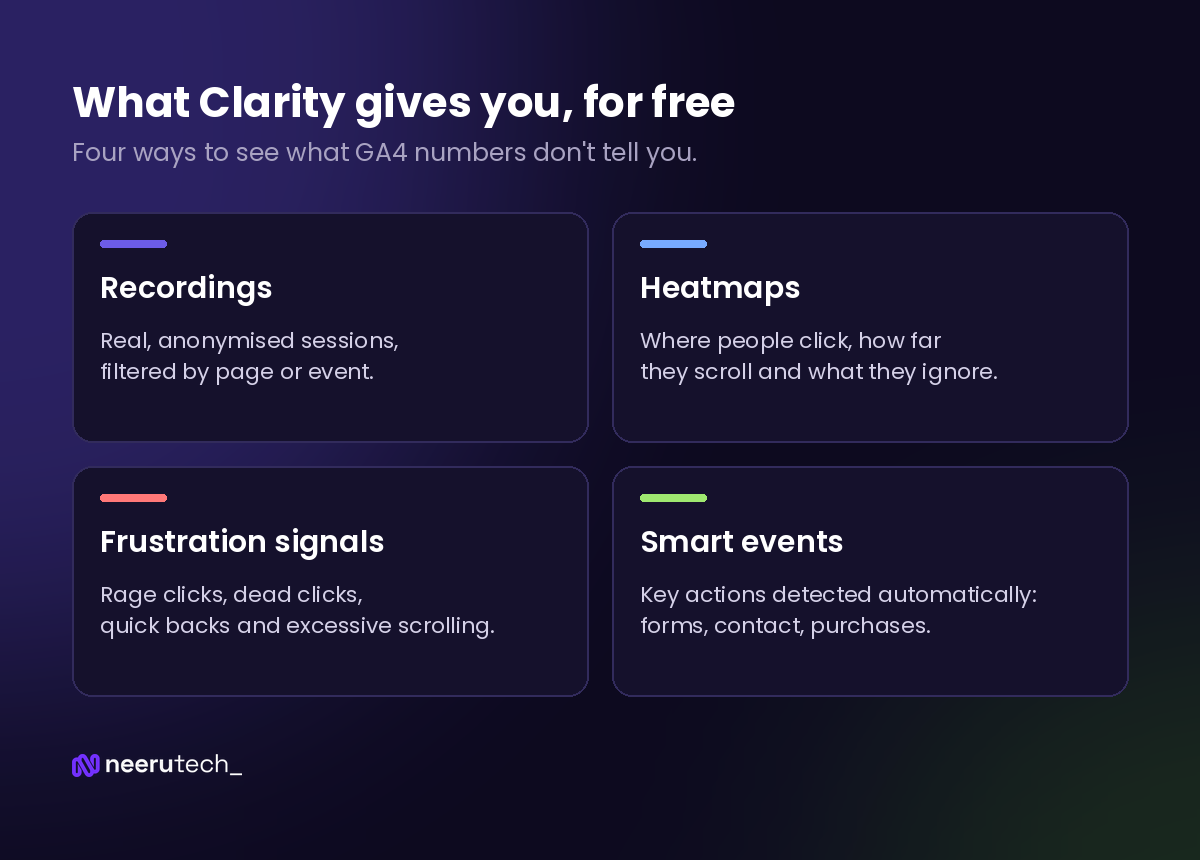
You can watch real visitor sessions, with sensitive data masked. The value isn't in watching them all, but in filtering them: mobile only, one specific page, sessions with frustration signals, or visits from a particular campaign.
A word of caution: a single recording proves nothing. What counts is the pattern that repeats across many.
2. Heatmaps
Clarity offers several types:
- Clicks: where people click and where they don't.
- Scroll: how far down they get. If your form sits in an area almost nobody reaches, that's a clear clue.
- First and last clicks: what grabs attention first, and the last thing touched before leaving.
- Dead clicks and rage clicks: where frustration concentrates.
3. Frustration signals
This is where Clarity adds what GA4 can't:
- Rage clicks: several rapid clicks in the same area. Usually a sign the user expects something to work and it doesn't.
- Dead clicks: clicks on an element that doesn't respond. Could be broken links, slow buttons or elements that look clickable but aren't.
- Quick backs: the user lands on a page and immediately goes back. Usually means the page wasn't what they expected.
- Excessive scrolling: scrolling up and down more than normal. Usually they're looking for something they can't find.
- JavaScript errors: technical issues affecting the experience.
4. Smart events
Smart events automatically flag important actions: form submissions, contact requests, purchases or add-to-cart actions. There are three ways to define them:
- Automatic: Clarity detects them on its own.
- Custom, from the dashboard: no code, based on clicks or visits to specific pages.
- Via API or Google Tag Manager: the most accurate, for when you need full control.
With smart events you can filter recordings and heatmaps to sessions that converted, or those that didn't, and compare them.
The detail that changes your data: consent
If your website gets visitors from Europe, this is the most important part of this article.
Since 31 October 2025, Clarity requires a valid consent signal for visits from the European Economic Area, the UK and Switzerland. If a user doesn't consent, or your cookie banner doesn't pass that signal to Clarity, your data changes like this:
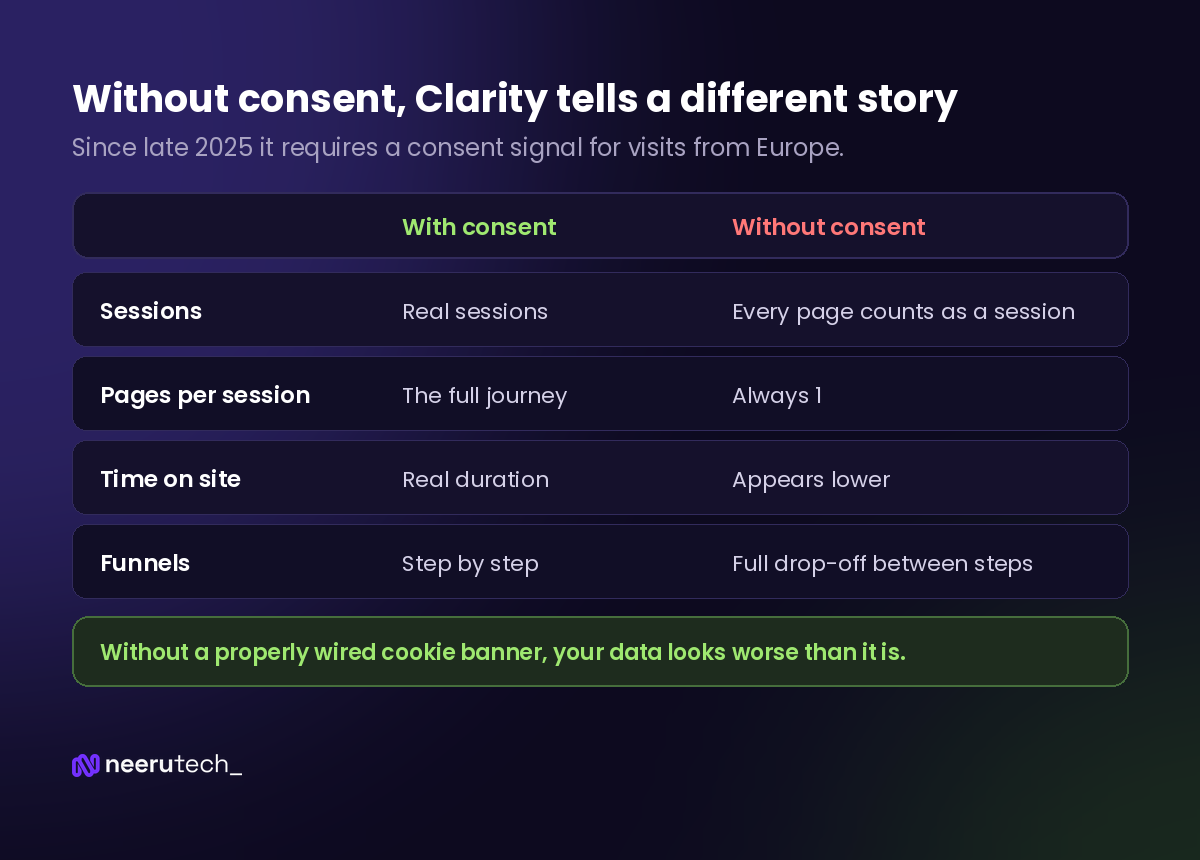
- Every page view counts as a session, so session numbers shoot up.
- Pages per session drop to 1.
- Time on site appears lower.
- Multi-step funnels show a full drop-off, even if people are actually progressing.
In other words, without a properly wired cookie banner, your data looks much worse than it is, and you can end up making decisions about problems that don't exist.
That's why, in every measurement setup we do, the first step is configuring consent properly and connecting it to both GA4 (via Consent Mode) and Clarity.
How we're using it with a client
We're currently building a client's measurement system, and Clarity is one of its key pieces. Our approach:
- Consent first, so the data is reliable from day one.
- Smart events for the actions that matter to that business, not for everything that can be measured.
- Frustration signals as alerts: if a page concentrates rage clicks or dead clicks, it's the first candidate for review.
- Filtered recordings to understand the why behind those signals.
- Everything summarised in the Looker Studio dashboard, alongside GA4, to track progress after each change.
The goal isn't to pile up recordings, but to have a data source that tells us where to look and lets us check whether a change actually improved things.
Common mistakes with Clarity
- Installing it and never looking again. Clarity is useless if nobody reviews the data.
- Drawing conclusions from one recording. Look for patterns.
- Not configuring consent. In Europe, that leaves your data unusable.
- Not masking sensitive content. Clarity protects form data by default, but it's worth checking what else appears on your pages.
- Using it without a question. It works far better when you start from a specific doubt: "why aren't people completing the form?"
Conclusion
Clarity offers one of the best ratios between what it costs (nothing) and what it delivers. But its value isn't in installing it; it's in configuring it properly, especially consent, and using it with specific questions.
Combined with GA4 and a clear dashboard, it takes you from "I think the website works" to "I know where people get stuck and why".
Frequently asked questions
Is Microsoft Clarity free? Yes, it's free, with no paid plans or traffic limits.
Does Clarity slow down my website? The script is lightweight and designed not to affect performance. Still, as with any third-party tool, it's worth checking speed after installing it.
Is it legal to use Clarity in Europe? Yes, as long as you obtain user consent for its cookies and mention it in your cookie policy. Without consent, the data it collects also loses much of its value.
Does Clarity replace Google Analytics? No. They complement each other: GA4 tells you what happens and where traffic comes from; Clarity helps you understand why.
Does Clarity record what users type into forms? By default it masks sensitive content. Even so, it's worth reviewing your project's masking settings.
Do you have Clarity installed but don't know what to look at, or aren't sure consent is set up correctly?
At Neerutech we set up your website's measurement end to end (consent, GA4, Clarity and Looker Studio dashboards) and help you turn the data into decisions. Explore our conversion rate optimisation service.
Do you use Clarity, Hotjar or another tool to see what your visitors do? Let us know in the comments.
Related articles
 Destacado
WordPress on AWS: What It Really Costs and Why We Moved to Managed Hosting
Real case: we moved four WordPress sites from AWS to managed hosting. What the server bill hides, how much the client saved and how we did the migration.
 Destacado
Anyone Can Have a Website Today. Making It Grow Your Business Is Another Story
A website alone won’t grow a business. Combine security, Google Ads campaigns and CRO to attract people looking for what you sell and turn them into customers.
 Destacado
You Have Website Visitors, But Do You Know What They Do? GA4, Clarity and Looker Studio for Data-Driven Decisions
How to combine GA4, Microsoft Clarity and Looker Studio to understand what your visitors do, spot where they drop off and improve conversions with data.